Running successful virtual meetings and workshops: a (cool) biologists’ perspective
Introduction
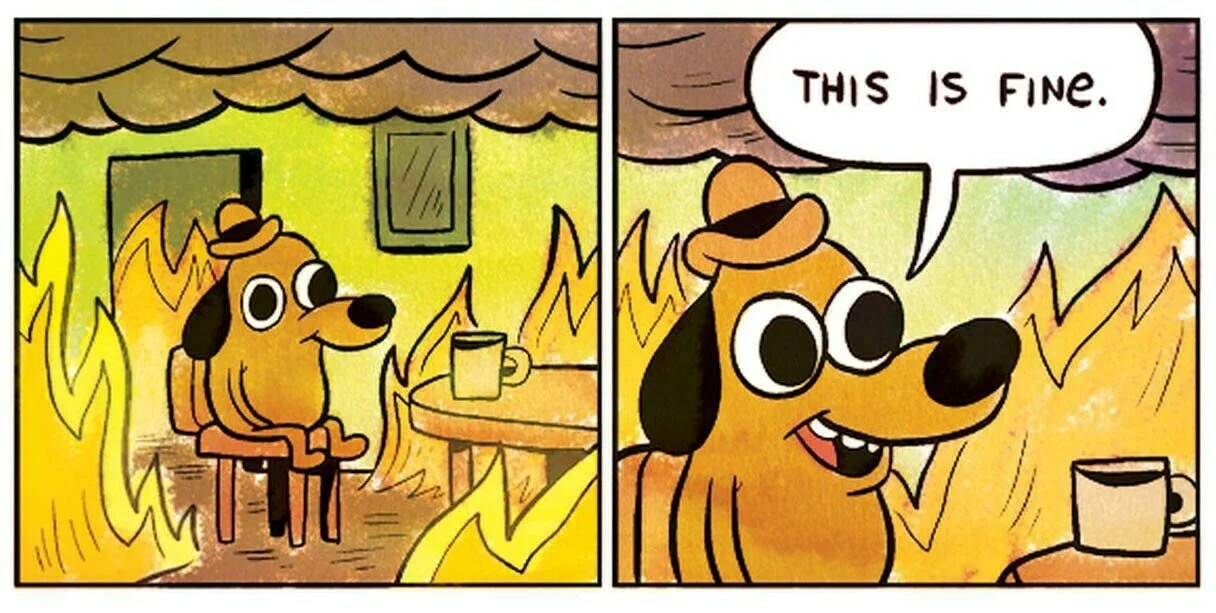
The level of acceptance of frankly, terrible meetings is …. fine.
We’ve all been there: it’s 45 minutes into a call, and the same 2-3 people have spoken for 90% of the meeting. The rest of us are scrolling through our emails in the background, DMing people at the meeting making snarky comments about the dumpster fire happening in real time, and wondering why we were even invited to join. This is not a successful meeting.
What are the traits of “successful” meetings I’ve attended?
Everyone feels connected and part of a broader community that extends beyond the meeting at hand
Everyone feels like they bring a unique and valued perspective/expertise to the meeting, and has a chance to contribute that
There is a clear outcome/sense of accomplishment from the meeting
It was fun!
Take a brief pause. How many meetings have you attended where you felt all of these things?
If the number is less than 25%, read on.
So why read this?
You want to organize better meetings
You are organizing something with me right now and want to know more about my philosophy about it
You want to plan an effective workshop/meeting with 1-4 hours of prep time
In this post, I will share my meeting philosophy and hopefully help you organize more fun, connecting, and successful meetings.
This post is extra. Like really extra.
I’m extra. Really extra. You might get that from the fact that I wrote a several page long document about planning meetings. I get this post might be really intimidating. If so, please don’t read the rest of my blog 🤪. Just kidding, I’m the kind of person who likes really detailed instructions because I’m terrible at “just figuring it out.” I wrote this post to be as comprehensive as possible, not that I think this the best way, but if I could explain to Little Callie everything I know now, they could read this post and save a lot of people, a lot of time (especially myself).
If you read this and are like, “omg I could never do all of this” remember: you don’t have to. Plan with your friends, share the love and labor, and it’ll make meetings fun and connecting! 💗
Starting with the WHY:

I’m a busy person. So are most of the people I’m organizing with. We have students who need help, kids to pick up, a big pile of laundry to fold, and probably forgot to eat lunch. We want to avoid the dreaded, “this meeting could have been an email” AT ALL COSTS.
So you gotta get it REALLY CLEAR why actually meeting is better than asynchronously working on a doc or messaging/email/Slack.
Here are some compelling reasons to have a meeting:
Building trust between new collaborators/teams so asynchronous organizing is more effective
Connecting a bunch of different folks together to synthesize expertise to brainstorm/create something new and/or build consensus around an issue/topic
Working meeting to regularly work on something that nobody is actually gonna do if you have to do it asynchronously
Force a Very Busy Person to actually listen to something that you need to tell them
Okay, reflect on which of these archetypes your intended meeting/workshop fits into. Now, let’s turn to…
WHO is in the meeting?
Now you’ve established your meeting goal, let’s think about who is in the room. To have effective communication, people gotta know who is in the room. Not just people’s names, but some idea of the expertise/context of who is in the room. To create anything meaningful, you gotta have trust between the meeting participants. To get a Very Important Person to listen, they gotta be interested in who is speaking. To connect people to create something new, there needs to be trust to be vulnerable to put half-baked (read: actually creative) ideas out there. To create something unique in real time, you need to be vulnerable to put pen to paper amongst friends (Have you ever tried drawing or painting with friends? Being creative with people can be scary!!) To build trust grow strangers/acquaintances to collaborators, well of course that requires building trust.
Okay, we get it Callie: you need trust. But how do you get there?
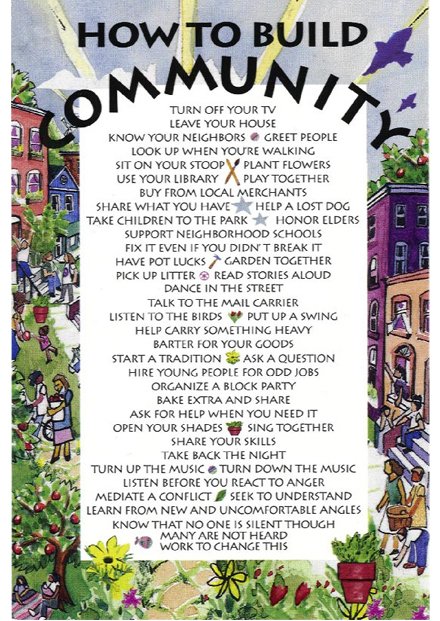
I think about building trust like growing community. Have you seen these dorky signs about building community?
It all starts with doing little things and building familiarity (hi, your face is familiar and we’re sharing space! I’m happy to see you. :) ). Then growing interdependence (hey, I can help you and you can help me, we’re connected now!). Then forming identity around the community (I see myself as a contributing and respected contributor in this space, showing up here makes me feel like I’m part of something bigger than myself).
If your meeting is already a gathering of friends, that’s easy. Probably everyone already feels part of the friend group and you have some established norms and expectations. Maybe the only thing needed to make the meeting fun is some unstructured “catch up” time at the beginning of the meeting to get everyone feeling warm, fuzzy, connected, and also some time to get all the recent life updates/gossip off the table.
Storytime: Chisme makes meetings more efficient
I was organizing a group where we intentionally scheduled the first 45 minutes of the 60 minute meeting as “chisme time”. Why, might you ask would you “waste” 75% of the meeting time catching up? This was a very connected group of organizers who, in addition to the summer camp we were running, were also deeply connected on a personal level. On a weekly basis, we might be over at each others’ houses for meals, swapping art supplies, going to kids’ music performances, or going to other activism/community events together. Everyone on that call had been swapping countless texts with everyone else all week about anything from the best farmer’s market to get speciality seasonal Japanese veggies, who in the friend group had a dehydrator, or whether anyone had tried out those new probes that could measure the “sound” inside mushrooms. Given this deep level of connection, why were we meeting? Well, we needed to briefly coordinate or check in on this particular project we were all collaborating on (a science/ summer camp). With the deep and various connections of everyone in the group, we needed a bi-weekly “check in” time to make sure everyone was doing what they needed to on ONE of the many collaborative projects we’ve all working on together. But given the deep and connected nature of the relationships in the group, we also had 10 million random side topics we want to catch up on while we’re all together. If we had started the meeting with the task at hand, there was a 100% chance that we would get derailed during the meeting talking about some ancillary topic or funny story. But starting the meeting with that meant everyone could have a good time, have a laugh, and also “get the sillies out of their system” so by the time we were ready to turn to the task at hand, people were focused and weren’t going to get off track.
But what if nobody knows each other? Or if some people know each other, but some are new? To build trust, you need to get everyone on the same level. You need to do everything you can to dissolve power hierarchies (of course, they will always be present in subtle ways) and, as best you can, get people into a sense of comfort and ease.

I am unabashedly a 90s kid and this meme will be relevant later, I promise.
Remember that two of the traits of a successful meeting are: “Everyone feels connected and part of a broader community that extends beyond the meeting at hand” and “Everyone feels like they bring a unique and valued perspective/expertise to the meeting, and has a chance to contribute that.” Both of these require trust and an intentional decentralization of intellectual power. Yeah, I get that someone needs to be a timekeeper and keep things on track (more on that later), but of the meeting participants, everyone should feel like they have an equal voice and expertise to contribute.
This is not the norm in meetings. Too often, there are a few “power players” that do most of the talking and everyone else is a peon. And those meetings, by and large, suck. So in the first 10 minutes of your Totally Awesome meeting, you gotta fight against those norms and establish a few Very Important Things:
Very Important Things to establish:
This isn’t a Normal Meeting but a Cool Meeting <insert Mean Girls Meme here>: I do this by welcoming people, by name, into the meeting when they join, engaging people in the chat, making some small talk, and PLAYING UNEXPECTED MUSIC (more on music later). You want to subtly shift peoples’ psychological expectations from their normal meeting vibe into *this might be an unexpected meeting that I should pay attention to the cultural expectations of*. 👀
New Power Dynamics - everyone’s voice matters: In this meeting, everyone will be expected to contribute (even if it’s us cheering on your scratchy voice in the middle of a grocery store while you call in) and everyone’s perspective will be valued. If you are “less senior” or “new to the group” your voice ESPECIALLY important.
I do this by especially making an effort to welcome new folks when they join the call, DMing new people a private message welcoming them and saying that I especially value their perspective and welcome them to share their thoughts, and if they aren’t contributing as much, DMing them a special question and discussing with them privately before encouraging them to share it to the group.
Expertise - the types of knowledge and expertise in this group are various and all are AWESOME - often meetings default to a normative set of valued expertise (do you have a Fancy Job Title? Are you more “senior”? Do you have training in “prestigious” domains such as STEM? Are you from a Fancy Place?). But Fancy People often don’t have any more expertise in the topic of discussion than anyone else
Okay, so how do I do it?
Icebreakers aren’t a waste of time

If you get it, you get it.
Some icebreakers are, but if used will intention, icebreakers can (1) set the tone of the meeting [see Important Things to Establish] and (2) give people in the meeting a sense of who is in the conversation.
A good icebreaker will:
Be fun and memorable: For a group that is mixed with people who know each other and some that don’t, a surprisingly effective one is:“Tell us something that nobody here probably knows about you". I’ve been shocked by what random facts I’ve learned about people I had known for decades. It really brings people together and sometimes reveals surprising connections. I was once in a multi-national group where a significant number of people somehow all did Capoeira. To emphasize connection and highlight different forms of expertise/cultural diversity, I recently was in a meeting where the icebreaker was, “What is a holiday or festival you especially enjoy and what is your favorite food for it?”.
Reveal something relevant to the conversation: For meetings where you want to subtly “map” expertise to build in a conversation, people typically ask traditional introductions, such as someone’s job title, institution/organization, etc. However, I find these questions reinforce normative hierarchies in the space and can result in some participants not feeling as empowered to speak, and the same voices dominating. There are questions that can subtly address power dynamics in a meeting and help equalize knowledge holding, I like to ask: “What is something that you can teach us how to make or do?” . Sometimes I ask something directly relevant to the meeting at hand. For example, for a meeting about science/art collaborations, I might ask, “Who is an elder or youth in your life that changed how you thought about art?”
Another important consideration is making sure that the icebreaker is accessible to everyone. For example, I often lead multigenerational meetings and workshops with a mixture of high school students, undergraduates, graduate students, and postdoctoral researchers/professors. In those meetings, some questions might be more difficult for professors to answer (“What is the most recent book you read?") , or for high school students (“How does your work advance anti-colonial practices?”). In very diverse groups, I like to think of questions that are bonding for everyone like, “What animal would your family best represents you and why?”. Often, people share the same animal and it gives stangers something to connect on.
I always reserve at least 10 minutes (sometimes upwards of 20 minutes if people are all strangers)) to the icebreaker in meetings. If the meeting has to be 90 minutes to ensure you can do a substantial icebreaker for meetings with all/mainly new people, so be it. You can’t do vulnerable, creative work with complete strangers. Building trust matters.
Use. the. Chat.
The best part of virtual meetings is, in my opinion, the chat. The chat is a venue for cheering people on, sharing resources, and expanding the conversation when folks can’t (or don’t want to) un-mute. At the beginning of the meeting, actively contribute to the chat and encourage others to, too. You want the chat to be 🔥.
Some ways to model using the chat:
Cheering people on, affirming what is being said, adding additional context/points to what is being said: Examples include: “🙌🏼yesssss I love that 🙌🏼”, “+1”, “have you heard about this related thing…”
Adding relevant links to what is being shared: Links to slides, related resources, meeting notes, etc. Make sure to keep adding key links to the chat since people who join later won’t be able to see what was shared previously.
Secretly encouraging people to speak: Dude, I spend 75% of meetings DMing people in the meeting who haven’t spoken yet asking what they think and discussing what they might share before they talk to the whole group. Sometimes, some meeting participants are more hesitant to share (read: power dynamics, bias, structural racism/sexism/all the isms, etc.) and it’s your responsibility as the meeting moderator to ensure that as many voices as possible are represented in the meeting. You invited everyone, right? Might as well make sure everyone can contribute.
Play music:
I’m not gonna lie: virtual meetings are awkward. When everyone gets on the call, sometimes there is this horrible silence that you can cut like butter. I always have music playing when the meeting starts. It instantly makes the meeting vibes INFINITELY better and, depending on what you are playing, can subtly what cultures are welcome/amplified/celebrated in the space. Two of my favorite songs to play are Haleakala Ku Hanohano by Hapa (thanks Corinne!) and Tu Con El by Frankie Ruiz (thanks Angely!). If the meeting will happen again, I love to ask people for songs to put into a shared playlist. But do a lil curation.
Let’s plan a meeting!
Okay, I’m done opining about my meeting philosophy. Let’s get down to brass tacks and go through how to plan, run, and follow-up a meeting from start to finish.
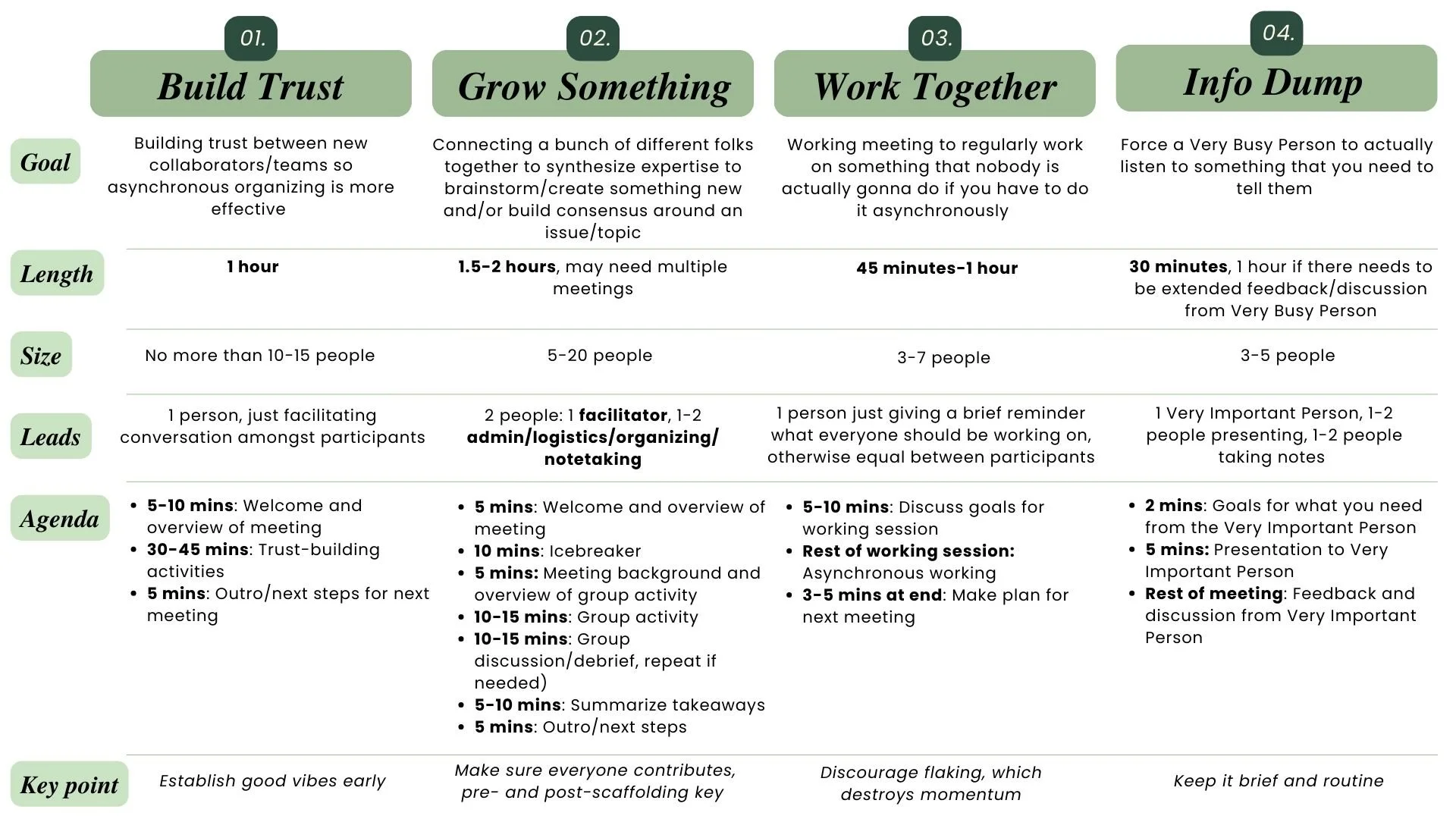
A typology of types of meetings and some parameters to work around.
Planning the meeting:
Your meeting fails or succeeds based on how well you plan it. Let’s break it down:
Meeting goals: The first thing you need to establish is what you are trying to accomplish. Remember that list from earlier? I made a handy table with my meeting typology and some meeting parameters.
Delegation of tasks: Make sure you know what all the meeting leads are doing (and they know too!). Make sure you have someone who is in charge of keeping the meeting running and encouraging participation (“run of show”) and someone who manages the waiting room, adds links to the chat, keeps track of time, etc. (“someone running ops”). For almost all meetings, this should be at LEAST two people. Make a plan ahead of time who is doing what.
Scheduling the meeting: I typically use tools like When2Meet to schedule meetings. I prefer to schedule standing meetings when possible during a regular meeting time. When deciding a time, make sure they do not regularly privilege certain time zones as well as people who might have evening/morning commitments (such as parents).
Reminders: Every meeting should have reminders sent: (1) at the time the meeting is scheduled with a calendar invite including a link to the meeting agenda and a video conferencing link, (2) 1-2 weeks ahead of the meeting with any prep work, (3) 3-5 days before the meeting with reminders of any prep work, (4) 1 day before the meeting with a final prep work reminder, (5) 3-5 hours before the meeting is scheduled with the video conferencing link featured prominently. Auto-scheduled email reminders are you friend. Also, use the BCC with the meeting participants unless other specified. Keep email text brief — long emails scare people. For final reminders, include a subject line like: “REMINDER: X meeting [date and time]” (or something like that).
Front loading content (depending on peoples’ availability): I like to send a slide deck and relevant links ahead of the meeting. People usually don’t look at it, but welcoming people to contribute helps with the good vibes. If you have a meeting where you need participants to do things in advance, send LOTS of reminders, when people sign up for the meeting make it clear they have to do stuff (I like to use a required check-box in the RSVP form that says something like, “in signing up for this, I agree to do X” with “I agree” and “Realistically, I can’t and I recognize that I am a terrible person” as the options … okay maybe not for a super formal meeting, but if you haven’t gotten this sense from my blog post thus far, I prefer more casual meetings).
Speaking of which, let’s talk about two other things you might need to create:
Project/meeting planning doc:
When I start planning an event/project that requires meetings, I always make a planning doc.
For a workshop, or workshop series, it’s usually a Google Doc with the following sections:
Overall goals: Goals of the event
To-dos: Updated routinely with @[various team members] so we know always know where to look at what to do next)
Key links/resources: Links to all slide decks, RSVP form/sheet, materials to send out, reference materials, etc.
Personnel and responsibilities: Who is involved and what is everyone doing? Who are you inviting? And making sure you have at least one back-up person to help run the meeting if a key organizer has an emergency and can’t show the day of.
Timeline: Everything leading up the event and timings for during the event
Notes/at-event notes: A space to write notes, record the chat, etc. at and after the event
For a standing meeting, such as a monthly meeting with a Very Important Person, weekly group meeting, etc. I make A SINGLE DOC with the following sections, which I fill out before each meeting:
At the top of the doc, I always have a standing link to the same virtual meeting link we ALWAYS use for the meeting.
For each meeting, I use a template that includes:
Date and time of meeting
Location of meeting
Who is in attendance?
Who is taking notes?
Overall goal of meeting (to complete beforehand)
Agenda (to complete beforehand)
Notes (to complete during meeting by notetaker)
RSVP Form and Poster:
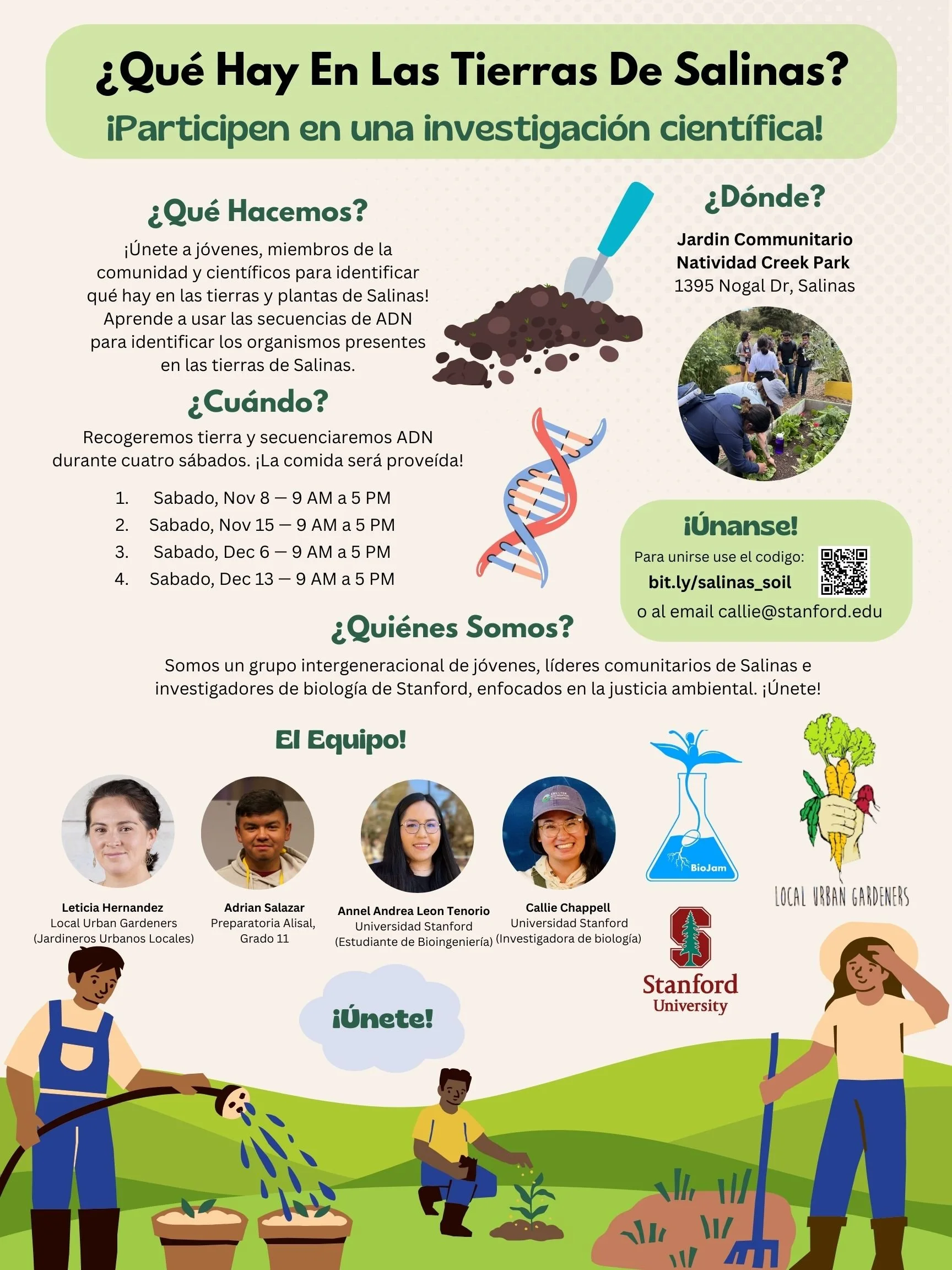
Example poster from a recent in-person workshop series I was co-organizing
For larger meetings and workshops, you also should make an RSVP form. I like to use Google Forms. I frequently forget to ask some important stuff in these forms (most recently, people’s names…. 😭) so I always make sure to ask:
Name
Pronouns
Email (so we can get in contact and send reminders)
What are you hoping to get out of the event?
Accessibility needs (captioning, etc.)
For workshops where you need to feature participants later, I always like to ask for headshots and bios in the RSVP form
For in-person events, dietary restrictions/preferences
Make sure you CLEARLY STATE in the advertising email AND form when you stop taking RSVPs. I would recommend ending the RSVP period at least a week before the event. For your own mental health planning.
Als, on a personal preference note, I HATE default looking Google Forms. I always change the font and often make a custom banner with the event poster to upload into the form.
Speaking of which, make an event poster. I like to use Canva. Include a QR code for the RSVP as well as a shortened URL (like using bit.ly) to the RSVP on the poster. Export the poster as both a PDF and JPEG to include in emails. I like to make square posters so they can be posted on social media as well.
Send all of this stuff at LEAST a month out from your event. It will take 1-2 weeks to get RSVPs and then you need to plan your event around the RSVPs.
Don’t forget about pre-meeting planning meetings:
I plan at LEAST 2-3 planning meetings before a big workshop. This usually includes:
One to make the planning doc and determine responsibilities
One after the RSVPs close to finalize the final event. Sometimes I have another meeting to go through making slides, virtual whiteboards, in-meeting activities, etc.
One immediately before the meeting, either the night before or 1 hour-30 minutes before the meeting
All meeting organizers/leads should be in the meeting at LEAST 10 minutes before the meeting starts to coordinate any last-minute changes, make sure everyone knows who is leading what, and be in the meeting before any participants join the waiting room. In that pre-meeting, make sure that (1) all organizers are hosts or co-host, (2) if you are recording the meeting, who needs to hit record [NOT the main leader of the meeting], (3) who will be moderating the chat, (4) what everyone’s additional responsibilities are (dropping links in the chat, engaging people who are quiet in the chat, etc.). Does everyone who needs to share/control the screen have the right permissions to do so and know how to? Any other tech things to test? If this is a more formal meeting, do we need matching branded virtual backgrounds?
I’m feeling overwhelmed about planning this
That’s okay. I know this sounds like a lot. But pretty much all of this can be accomplished in a 1-2 hour planning meeting, or 1-2 hours of asynchronous work. For more causal meetings, you probably don’t need all of this stuff. This is more for larger group calls and workshops.
Here’s a checklist to help you…
To do at a planning meeting:
Make planning doc (responsibilities, set outline for meeting activities, solicit feedback, etc.) 👉🏼key point: make sure to identify facilitator, ops person, and back-up to ensure they will be at meeting and know what is going on
To do asynchronously or during planning meeting:
Make/set up video conferencing link
Make RSVP form (if using)
Make poster (if using)
Send out email with video conferencing link with a calendar invite, schedule reminder emails
Prepare the slide deck or doc or virtual whiteboard, whatever you will use during the meeting. This includes whatever you’re presenting AND instructions/templates for whatever the participants are supposed to do
Prepare QR codes and links to any key documents/resources to share during the meeting
To do during pre-meeting check-in:
Finalize everyone’s roles
Assign hosts and co-hosts
Decide who is sharing slides, audio, and do a IT check
Hype people up! And get excited!
Have someone keep an eye on emails for last-minute changes and cancellations
Optional: set up a sub-chat for organizers on a different platform to coordinate during the meeting
Optional: make and share special Zoom virtual background for organizers — could do before if possible
How to run an effective meeting (in the meeting):
Okay, you’ve planned the most badass meeting and now you’re in charge of it. How should it go down?
Welcome people with some music
I always have music playing when the meeting starts as people trickle in. Welcome people by name and have some small talk to make it feel welcoming and joyful. I also start to engage people in the chat, keep dropping links to any slides/materials, and encourage people to share something fun in the chat. This sets the tone for the entire meeting.
Tell people what to expect
I usually meetings with either a slide or a link to a doc (and then also pasted into the chat) with the expected meeting agenda. This helps people know what to expect. Also, tell people if you’re going to go into breakout rooms, or whether they will need to un-mute themselves and go on camera. Some people might need to plan to move or share in the chat that they cannot depending on where they are calling in from. This is also a good time to establish norms for the meeting (everyone’s voice is respected and valued, we value direct participation through unmuting and talking (are you with a bunch of unruly people who love to talk and need to use the “hands up” feature?) or in the chat, take space/give space, etc.). Make sure you explain/give a heads up if you are using Chatham House rules or making a recording the meeting, including any AI notetakers/if you will use AI to create any meeting outputs. I’m horrible about remembering to hit record, so I always make the person running ops co-host (or host) of the meeting and deputize them to do the meeting recording.
Who is in the call?
This is when you can use all the tips above about taking stock of who is in the room though a connecting activity or icebreaker. A few tips:
Clearly explain who will choose who speaks next. Either you call on people (and tell people you will call on people), send a list of who will speak in order in the chat (this is difficult since the final number of people in the Zoom call can change and sometimes isn’t exactly who signed up, but if you have a second person running ops, they can put this together while you do the welcome — I have found doing this is helpful if the icebreaker/intro involves people having to present something pre-prepared. Although note: apparently new zoom allows you to edit the chat), or do popcorn, where the last person to speak calls on the next people. Sometimes people at the end will forget who has already gone, so I always keep a lil notepad next to my desk where I keep track of who has not spoken yet.
Make it easy to see people: Do not screenshare or pin a specific video, make sure that participants can see the full gallery view.
engaging and equitable activities
Remember, the purpose of the meeting/workshop is to gather awesome people together to discuss/create something cool. So make sure that the majority of the meeting is spent doing that. YOU have to figure out how to unlock everyone’s excitement, participation, and collaboration. I like to use active learning techniques for teachers to make engaging activities. These include “think-pair-share” activities, where you pose a question/challenge, give 2-3 minutes of quiet reflection time, put people into small groups (breakout rooms) to discuss, and then reconvene as a group for a whole group discussion. I like to scaffold the quiet reflection time and breakout rooms with a virtual whiteboard (I love Miro) or “fill out this Google slide” so everyone has a chance to write stuff down and then you can see that collectively grow as a group. Simply seeing this and the emergence from everyones’ collective ideas already helps meeting participants feel a sense of accomplishment from coming together and implicitly platforms everyones’ voice (even if not everyone can speak). When choosing a platform for asynchronous work, go as simple as possible. You want people to be able to contribute immediately, so choosing a complicated platform where half the participants will struggle to figure out how to work it will derail the group discussion. I like to play music during quiet reflection time and stop the time when the song ends. It creates a natural transition time (people know when the time is over) and also nice vibes. In an in-person event, people subtly notice when the song ends and then are more likely to pay attention to you to listen to instructions on what to do next.
When debriefing as a group, power dynamics often can come into play with who feels comfortable speaking and taking up space. When opening a group discussion, it’s often helpful to remind people the key meeting norms, such as “make space (if you are otherwise inclined to be chatty), take space (if you are otherwise inclined to be quiet)” and saying that you’ll wait for three hands in the air before you call on someone (and then call on people in reverse order of hands up). I also like to use the chat (or if you are moderating, deputize another organizer AHEAD of the meeting starting) to DM people who are quiet to encourage them to speak. If someone is going on forever speaking, unless this person is an elder, do not be afraid to cut them off. Especially if the person is used to taking up space, a kind hearted by firm interruption can be MUCH appreciated by the rest of the group.
In some groups, I know a few people like to dominate the conversation. I’ve had private meetings with them before the meeting asking them to please be specially aware of how much space they are taking in the meeting and explaining why I feel that equitable speaking time is so important for this meeting in particular. Usually people behave themselves after that. I also sometimes tap in someone else in the meeting that the "loud voice” knows already to subtly engage them in the chat, so they feel like they are able to speak/contribute, but don’t dominate the group conversation.
A note on breakout rooms
There are a few ways to really mess things up with breakout rooms. To avoid this, I suggest:
Consider who is in the room: Have your person running ops make the breakout rooms during the welcome and introductions. While preparing for the meeting, I suggest discussing with your team and ops person how you want to split people up. Mix up people who don’t know each other to they can meet new people? Group people by shared expertise or interest? Depends on the goals of the meeting. Consider best practices with attendees with minoritized identities. So don’t put all people with minoritized identities in the same group (unless that makes sense given the meeting), but also don’t make groups where there is only one person of a minoritized identity in each group if you can avoid it. The ideal size of breakouts is at minimum, 2 people (good for more informal/personal discussion like, “share a story of a mentor who impacted your trajectory in science”) and no more than 5. More than 5, there’s not enough time for everyone to speak and contribute.
Managing the breakout rooms: BEFORE people go into breakout rooms, give them very clear instructions about what to do and how to do it. I recommend having a slide that you show (and everyone has link to the slide deck) that explains: (1) What to discuss in the breakout room, (2) If they need to do something (like fill out a slide, section of a doc, virtual whiteboard) how/where to do it, (3) how long they will have in the breakout rooms and how long they have to share out (“1 min only!”), (4) roles for people in the breakout room (who will share out, who will keep time, who will take notes, etc.). Often, self-delegation of roles can reiterate dominant power hierarchies, so consider pointing that out and challenging groups to counteract that with their job choices. Put these instructions in the chat as well BEFORE they go into breakout rooms so everyone can see it. I promise you, people will immediately get into the breakout room and be like “what are we supposed to be doing???”.
Breakout room admin: Breakout rooms should be about 10 minutes. Less than 10 mins, people are generally still getting to know each other and into the flow of conversation. More than 10 minutes they are already done, getting bored, and the big meeting gets disconnected. At the 5 minute, 2 minutes, and 1 minute mark, send out a broadcast message reminding people of how much time they have. Always have at least one person (usually the meeting leader and the ops person) NOT go into breakout rooms and use the time to discuss how the meeting is going, if anything needs to be adjusted (like timings), help people who got lost from their breakout rooms, keep track of time, and send reminder broadcasts. Also, take a lil break. You can also monitor the breakout rooms on Zoom while not being in any rooms by (1) looking at what the rooms are writing in the shared slides/doc/whiteboard etc. and see if any haven’t written anything down, and (2) looking at who is speaking in each breakout room and whether any are getting dominated by one/few people in the participants tab.
Sharing out: A lot of the same power dynamics that play out in the main room, also play out in breakout rooms. The same people who will be chatty in the main room, also are likely to talk more in the breakout and self-nominate to share out from the breakout. Avoid this by before going into the breakout rooms, explaining who will share out from each room (such as “the person with the darkest shirt on”, etc.), if you didn’t already have groups self-delegate roles as described above.
Closing the meeting
At the end of the meeting, it’s the role of the meeting organizer to reflect/summarize the overall discussion and explain how it will inform next steps. This helps participants feel a sense of accomplishment about the collective endeavor and see how what was done during the meeting will have impact beyond the meeting. Let people leave with a sense of accomplishment, enjoyment, and being appreciated and respected.
Accessibility
Meeting accessibility is crucial to make sure that everyone can contribute. This can be subtle, such as offering multiple modalities of engagement, and structural, such as offering captioning. I’m no expert in accessibility, but I always try my best. I like this resource with more information. If you have additional advice, please share! People always forget about one of the most important accessibility considerations: when you schedule the meeting. Consider time of day and time zone to be as inclusive as possible. If you’re the kind of person who is used to having meetings scheduled around you, consider scheduling the meeting when folks who are often structurally excluded can join. Sorry if you gotta wake up early or go to bed. Think about it as payback.
A note about joining virtual meetings from a phone:
Often people have to join on a phone, and the experience of joining from a phone (with the Zoom app) is very different than a computer. If you anticipate many people joining via phone, try it out. Some best practices include: avoid use of chat (or reading the chats out loud as they come in), giving people on phone a heads up if they’re expected to speak, and giving a special time for people on phone to chime in without needing to raise their hand.
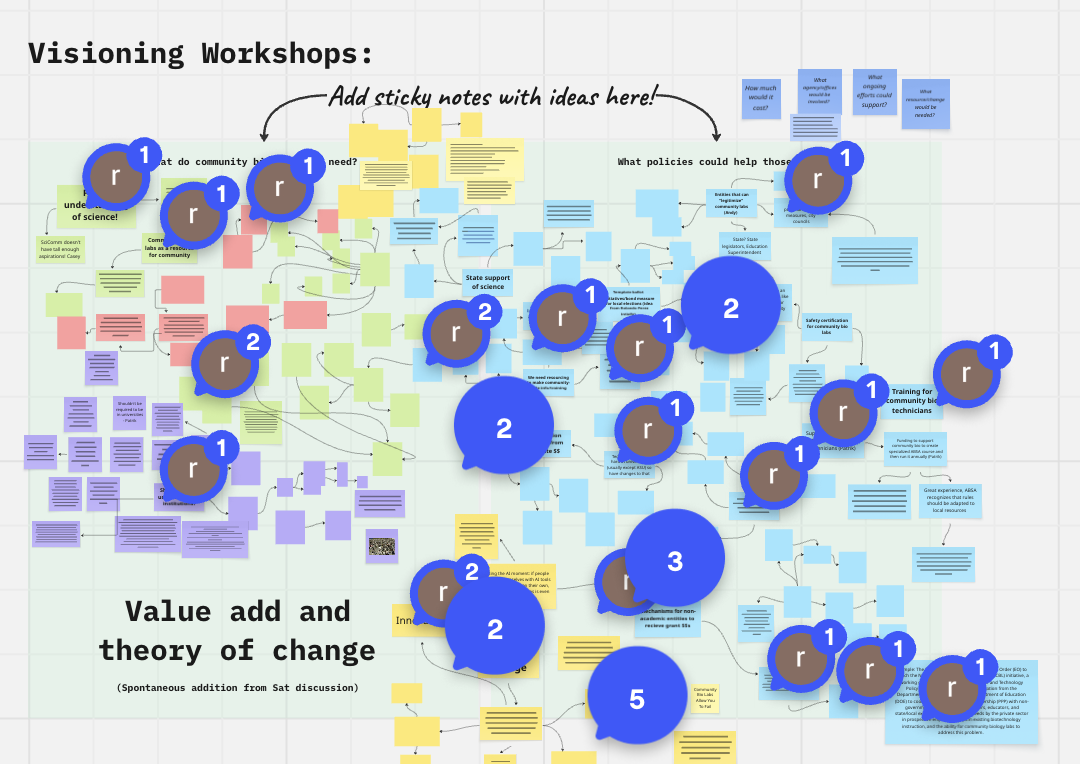
Example virtual whiteboard from a workshop. Make sure you explain to everyone to use the tool —Here, ”r” accidentally added comments instead of sticky notes!
Following up the meeting
Useless meeting outcomes kind of makes the meeting obsolete, right? Make sure all your effort to run a good meeting makes it live on! I do this through:
Prompt follow-ups: I always send an email (usually drafted before the meeting starts) with a quick thank you for attending, links to anything relevant from the meeting (slides, virtual whiteboard, notes), and action items/next steps (anything people need to do, next time to meet, etc.). Send this within 24 hours of the meeting, ideally right afterwards, hence why drafting 90% of it before the meeting helps.
Debriefing the meeting: For big/important meetings, I usually keep some time during the next organizer meeting to debrief how it went and see if there was anything we should change next time. For organizations that use Slack or have a group chat, I will usually post something encouraging on there and solicit feedback. People usually have feedback immediately after the event and then forget, so solicit that right away while ideas are fresh.
My Anxiety has Entered the Chat: Sometimes, as a meeting leader, I get paranoid about saying something strange or poorly managing a situation. I usually try to have at least trusted friend/collaborator in the meeting I can talk to after the meeting to discuss anything where I’m stressing over something I accidentally said/flubbed/got off track about. This is more a form of emotional support for the organizer/moderator than anything else. Be thoughtful about who you ask for this labor from.
Also: no meeting will be perfect! There will always be lil flubs, ways to do better, and things ya learned. I frequently host meetings when at the end, someone is like, “well that was awkward…” It happens, we all learn, and the same meeting someone thinks is awkward, another thinks is awesome.
That being said, sometimes, truly awful things CAN happen in meetings (I once had to file a Title IX complaint due to some inappropriate conduct in a Zoom call) and your team should have preparations in case an incident is brought to your attention.
Conclusion: Ready to have a great meeting?
I hope this was a fun and helpful read for planning meetings. I have no idea whether the meetings I organize are great or yet another “could have been an email”. But alas, I traverse forward. I’m curious what has worked for you, your tips, strategies, and epic fails. My meeting philosophy has also changed significantly over time, so look forward to continuing to grow and learn. Please add your ideas in the comments!
I also want to acknowledge some of my teachers, mentors, and inspirations in exemplary meeting leadership, including Corinne Okada Takara, David Kong, Maria Chavez, and Richard Murray. You all rock and have inspired me so much! Thank you. Also, thank you to Nasa Sinnott-Armstrong for contributing to this post.
See y’all on a virtual call soon!